
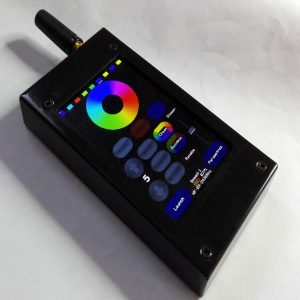
Introduction #
Thank you for purchasing an Electroconcept product.
Please read carefully the following guide before using Remote control V1.
Responsibility:
Electroconcept can’t be held responsible for any damage caused by a misuse of any kind such as loss of utilizing, consumable destruction (tapes, CDs, LED Strips, etc.) or any other financial loss due to an inappropriate use of our products or any impossibility to use them; so as any wiring mistake during the installation.
Guarantee:
Electroconcept products benefit from a two years manufacturer guarantee (electronic components only, except consumable ones e.g plastic components). The product must be returned to Electroconcept postage paid and in its original package. If not, the package will be refused and returned to sender. Electroconcept company is in charge of the product restitution.
Are excluded of the guarantee benefits the followings : any damage caused by carelessness, mistake, lack of maintenance by the user (broken, burned, heated, soaked, silted up, etc.); wrong installation or misuse by the user.
All our products are tested before sending to buyers. Modifications of any kind are at your own risk and out of guarantee benefits.
Technical specifications #
- Power supply: via USB DC + 5 V
- Consumption: 150 mA – 200 mA
- LI-ION battery: 1200 mA
- Dimensions: 102 mm (134 mm with antenna) x 54 mm x 16 mm
- HF power: 2,4 GHz, 20 db or 100 mW
Information #
Using HF Electroconcept products does not change how you use your DMX devices.
The technology used in this product ensures complete transparency between your devices.
For each HF universe, all 512 channels are sent. Frame synchronization ensures there is no latency between the emitter and receiver.
Each receiver has a memory that allows it to send back the last value received if there is a loss of HF connection.
All your products that use built-in receivers can also be used with a wired connection.
The range depends on the environment, approximately 30 m in a hostile environment (between thick walls, for example) and approximately 300 m outdoors.
Installation #
Remote control V1 is switched on with the ON / OFF button on the side. Then, all handlings are performed through the touch screen.
Before first use, please proceed to a battery full charge.
Usage #
Each HF receiver is assigned by default on universe ID 1. At startup, the receiver scans continuously frequencies until it finds the universes to which it is assigned.
By default, your devices are delivered configured on ID universe 1 and the remote control in Auto mode.
Navigation through all remonte control V1 settings is handled with “up” and “down” arrows and by pressing the buttons on the touch screen corresponding to what you want to command.
Control screen:
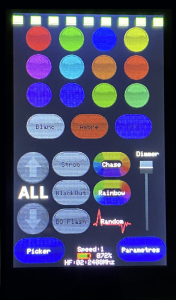
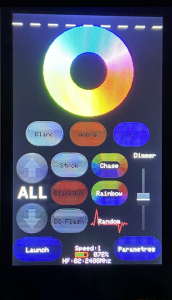
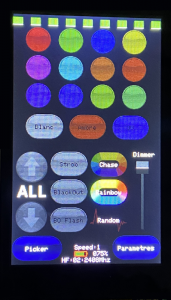
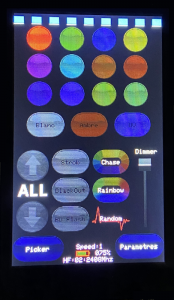
Picker button allows to toggle between these two control screens. The first screen has predefined colors, the second one has colors to create with the colors wheel.
“White”, “Amber” and “UV” buttons allow to activate them on compatible devices (QPAR188 6in1 or DECOLED 512 for example).
“ALL” allows to control all zones at the same time. Then, there are 8 zones that are addressed in DMX.
| Zone | Address |
| 1 | 1 |
| 2 | 9 |
| 3 | 17 |
| 4 | 25 |
| 5 | 33 |
| 6 | 41 |
| 7 | 49 |
| 8 | 57 |
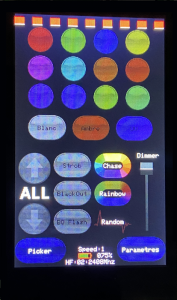
Remote control buttons and effects description:
| Button | Effects |
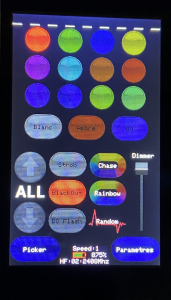
| CHASE | Launches scrolling colors internal program in the selected area. Repeated pressings allow to choose the scrolling speed, 7 speeds are possible, and to stop the program. When the program is off, the button is dark. |
| RAINBOW | Launches scrolling color internal program with fading between each color in the selected area. Repeated pressings allow to choose the scrolling speed, 7 speeds are possible, and to stop the program. When the program is off, the button is dark. |
| RANDOM | Launches a fading random colors program in the selected area. Repeated pressings allow to choose the scrolling speed, 7 speeds are possible, and to stop the program. When the program is off, the button is dark. |
| STROB | Allows to activate stroboscope channel of controlled devices in the selected area. If the fixture of the selected area doesn’t have a stroboscope channel, this button has no effect. |
| BLACK OUT | Permits to deactivate color permanently on the selected area. The button becomes red. |
| BO FLASH | Allows to deactivate color only when the button is activated on the selected area. When the button is deactivated, the color comes back. |
| DIMMER | Dimmer potentiometer: in predefined color mode: allows to reduce the color intensity; in colors wheel mode: potentiometer allows to dull the color and to reach brighter colors on the second part of it. |
Remote control V1 menus description:
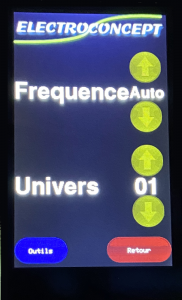
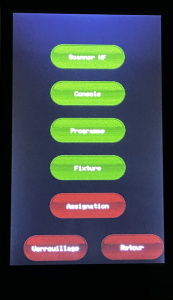
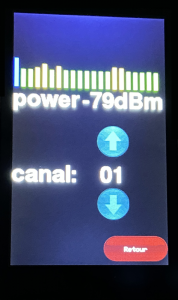
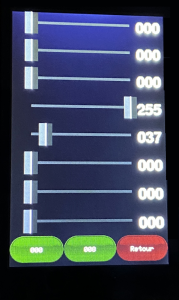
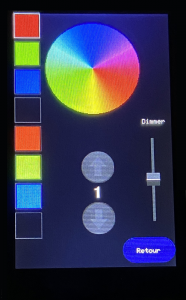
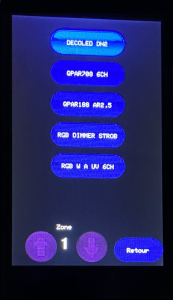
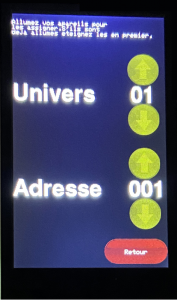
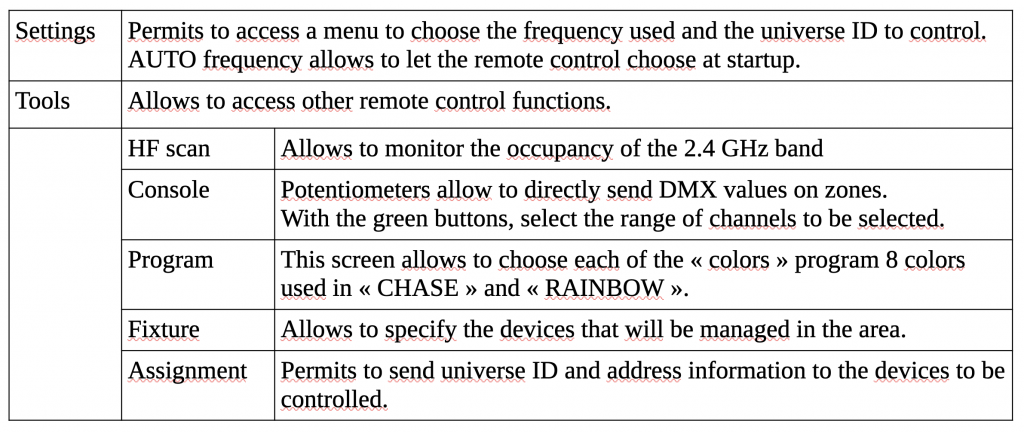
How to assign your devices?
- Switch on Remote control V1, ensure the antenna is screwed on the device;
- Go to Remote control Assignment menu, choose the ID of your DMX HF universe ID and DMX address if needed for your DMX HF receivers;
- To select ID universe and address wished, move onto the touch screen with the arrows;
- Once the universe and address selected at the top of the screen, remain in this menu and switch on your device;
- The LEDs on your DMX devices will flash six times quickly to confirm that they have received the assignment information then will flash slowly while searching for a DMX HF signal;
- Once the assignment has been completed, to check that the information has been received, proceed to a transmission test.
CAUTION: by assigning your devices on another ID universe than the default one, namely ID universe 1, remember to change the remote control ID universe as well, otherwise there will be no connection between the remote control and your HF DMX devices.
Table of authorised frequencies according to Decision No. 03-908 of the Telecommunications Regulatory Authority:
| 1 | 2404 Mhz |
| 2 | 2408 Mhz |
| 3 | 2412 Mhz |
| 4 | 2416 Mhz |
| 5 | 2420 Mhz |
| 6 | 2424 Mhz |
| 7 | 2428 Mhz |
| 8 | 2432 Mhz |
| 9 | 2436 Mhz |
| 10 | 2440 Mhz |
| 11 | 2444 Mhz |
| 12 | 2448 Mhz |
| 13 | 2452 Mhz |
| 14 | 2456 Mhz |
| 15 | 2460 Mhz |
| 16 | 2464 Mhz |
| 17 | 2468 Mhz |
| 18 | 2472 Mhz |
| 19 | 2476 Mhz |
| 20 | 2480 Mhz |
| 21 | 2483,5 Mhz |


